
AI automation · Picvelo, Jubiler Pagacz · 2026 · 3 months (ongoing)
Google Ads run with code - a worker with hard limits
A campaign is built from a specification file and lands in the account paused, so no script can accidentally start spending money.
- Node.js
- Google Ads API
- Anthropic API
- SQLite
- Express
- React
- Python
The challenge
The ad account of a small SaaS or a local salon is too little work for an agency and too much to look at once a week. A Performance Max campaign was eating the budget on traffic from the ad network at a dozen or so grosze a click and zero sign-ups, and the system's recommendations came down to raising bids. On top of that comes a question the ad panel doesn't answer: which sign-up in the app really came from an ad.
Our solution
The account is run with code. The campaign definition sits in a specification file, a script creates it through the API as paused, and every change first goes through a trial validation, with no write to the account. On top of that, a worker runs in a cycle: it pulls campaign and search-term data, asks a model for a list of actions, passes them through a layer of hard limits, and only then touches the account. Attribution doesn't rely on a browser tag but on a click identifier saved on the server at sign-up.
What we built
- 01 A campaign described in a file and created through the API as paused
- 02 Validation with no write before every change on the account
- 03 A worker in a cycle: pull data, model proposals, limits, write
- 04 Limits: daily budget, a maximum 20% change, three changes per campaign per day
- 05 A list of allowed actions: negative keywords, pause, resume, budget, flag for review
- 06 A block on raising the budget after seven days with zero conversions
- 07 PAUSED and EMERGENCY_STOP modes: a stop for all changes
- 08 A campaign with a manual flag that the automation doesn't touch
- 09 Several accounts in one tool, each with its own limits and business context
- 10 Observation mode: a full cycle with no change on the account
- 11 A React panel: campaigns, decisions, manual actions, settings
- 12 Telegram notifications, a decision log, and snapshots in SQLite
Contents +
- Starting point
- Decisions that shaped the project
- A campaign as a file, not a form
- Validation before writing, always
- Hard limits instead of trusting the model
- A campaign the automation doesn’t touch
- A decision log instead of a black box
- The truth about conversions on the server side
- In practice: rebuilding the account
- The second account: a jewellery salon
- Two smaller tools alongside
- What came out of it
- Technically
Starting point
Picvelo, our platform for photographers, sells a subscription for PLN 30 and 65 a month. At that price the ad budget is small, and every wasted hundred is a real percentage of the month’s costs. You can’t leave the account to itself: search terms collect junk, Performance Max spreads across the ad network, and the system itself mostly suggests raising the budget.
At this scale an agency makes no economic sense. Clicking in the panel once a week means a week of burning money before anyone notices the problem.
Decisions that shaped the project
A campaign as a file, not a form
The campaign structure (groups, keywords, ad copy, bids) is described in a specification file and created through the API. That puts what went into the account in one place, and a change is an edit of a file, not a series of clicks that nobody can reconstruct a week later.
The campaign lands in the account paused. Even a successful write doesn’t cost a penny until someone turns it on deliberately.
Validation before writing, always
The Google Ads API lets you send a change in validation-only mode: it goes through the full check on the system’s side, including character limits in ad copy, but changes nothing. Every operation goes this way first, and the write is a second, conscious step.
Hard limits instead of trusting the model
The worker pulls data, and the model receives it and returns proposed actions, but has no access to the account. Between it and the API stands a layer of rules: a maximum daily budget, a maximum one-off budget change of 20 per cent, at most three changes per campaign per day, and a list of allowed action types. Everything outside the list is rejected and logged with the reason.
A separate rule blocks raising the budget of a campaign that has had no conversions for seven days. That is exactly the move the ad system’s own automation suggests, and the one that hurts most on a small account.
A campaign the automation doesn’t touch
Every campaign has a manual-control flag. If a person changed it by hand in the panel, the worker skips it. Without that, every manual correction lives only until the next cycle, and a tool that reverses the owner’s decisions ends up in the bin within a week.
A decision log instead of a black box
Every proposal goes into the database together with its verdict and reasoning. The panel shows it as a list: what was supposed to be done, what was carried out, what was rejected and why. An automation you can’t see the workings of is worse than no automation, because you have to take its word for it.
The truth about conversions on the server side
A sign-up is attributed to an ad on the basis of the click identifier saved when the account is created, not on whether a tag in the browser managed to fire. The owner’s panel therefore shows sign-ups from ads regardless of blockers, cookie consent, and browser errors. Budget decisions are made on that number.
In practice: rebuilding the account
The tools were built to be used. Performance Max was paused, and in its place came a Search campaign built from a specification: one active group instead of three, bids on maximising clicks with a PLN 5 ceiling, a budget of PLN 15 a day. The campaign sends people to an ordinary product page, not a separate landing page. We write separately about when a landing page for Google Ads (in Polish) pays off at all. Here the traffic is still too small for that cost to pay back. On top of that comes an exit rule agreed in advance: once a set amount is spent without a single sign-up, the campaign is switched off.
A stop condition set in advance matters here as much as the campaign itself. Without it, the test “does the ad work” never ends.
The second account: a jewellery salon
At the end of June the tool gained support for several accounts. Each has its own file with limits, separate access data, and a description of the business that goes into the prompt: what the company sells, what it doesn’t sell, which queries are on target. The worker and the panel work only on accounts marked as enabled. Today the active account is the jewellery store, taken over on 3 July.
The rules for the jeweller differ from those for the SaaS, so they sit in the configuration, not in the code. The store was in its ramp-up phase, so zero conversions triggers neither cuts nor a pause. The total budget of all campaigns has a ceiling of PLN 32 a day, agreed with the owner. A phone call from an ad counts as a conversion worth PLN 40, because the salon closes the sale by phone. Queries like “made to order” or “with engraving” are protected from being added to the negatives: the jeweller makes bespoke jewellery, and a model without that knowledge treated them as off-target.
Before taking over the account, the worker ran for three days in observation mode: a full cycle, proposals and verdicts in the log, zero changes on the account. That shows what the automation would do on someone else’s account before it does anything for real.
Two smaller tools alongside
The first is a command-line layer over Google Ads and the Meta Marketing API: checking the connection and previewing campaigns from the terminal, without clicking through two panels. The second is a publishing calendar and newsletter pipeline in Python on the standard library alone, with a panel showing clicks, CTR, and positions from Search Console in 7, 28, and 90-day windows. Access to Search Console is read-only.
Neither is a product. They are tools for specific companies, at a size where they can be maintained.
What came out of it
The tool serves two accounts: ours (Picvelo) and a client’s (the jeweller). Neither is public, so none of this can be verified from outside. What the code and the decision log show is discipline: no write skips validation, no budget change exceeds the limit from the account’s configuration, and on the Picvelo account a campaign with no conversions for seven days doesn’t get a raise.
What we don’t know: whether the rebuilt Picvelo Search campaign really brings in sign-ups more cheaply than the earlier Performance Max. The exit rule (a set amount spent without a conversion ends the campaign) is in place, but we don’t yet have a result that could honestly be given here. These tools measure and limit risk, and they don’t guarantee a campaign’s result. This is one of the projects of AI automation for business that we build.
Technically
Node.js 20 in ESM, google-ads-api for reading and changing the account, @anthropic-ai/sdk (Claude Sonnet) with tool use for proposing actions, SQLite for snapshots and decisions. The API runs on Express with session login, the panel is in React and Vite, all behind nginx on a VPS, and the worker cycle is started by a systemd timer. Notifications go to Telegram. The configuration of accounts, limits, and business context sits in JSON files, one per account.
Screenshots
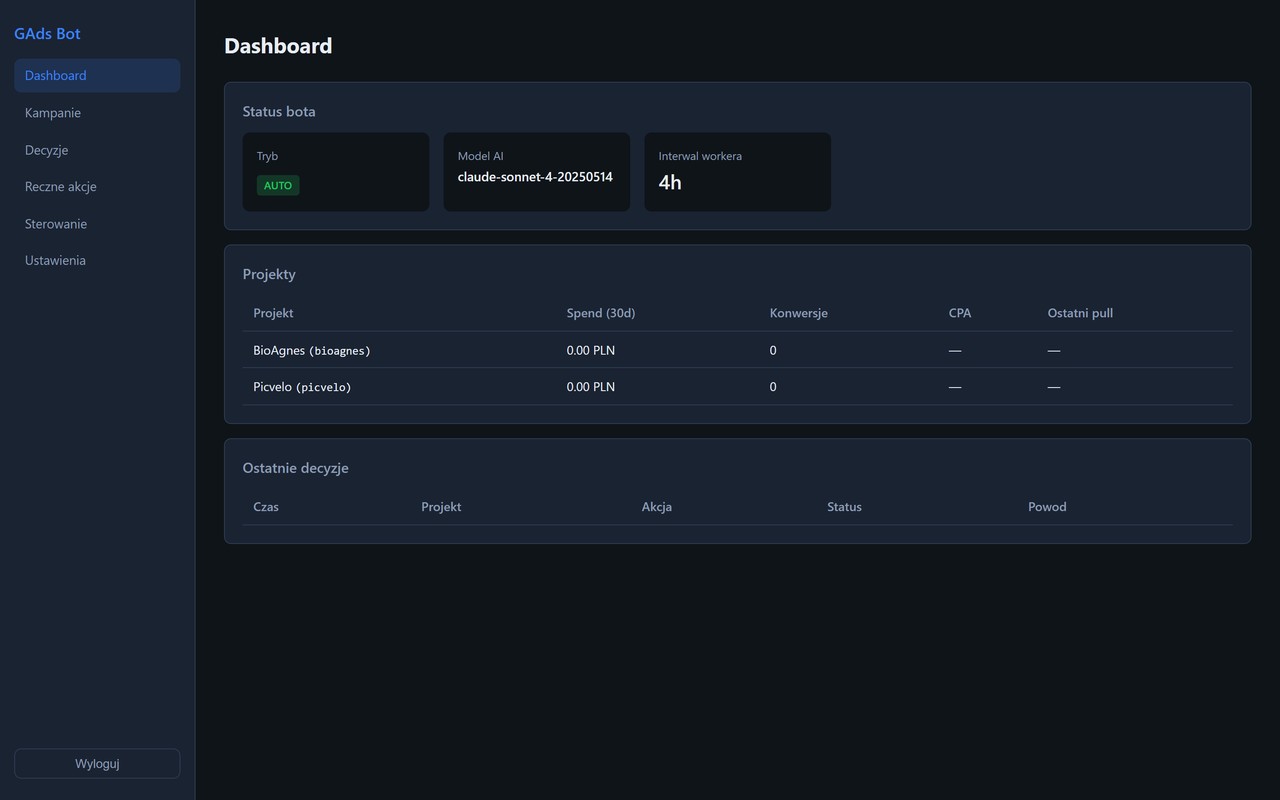
The bot panel: operating mode, model, and cycle interval on top, with the accounts and their limits, described in separate files, underneath.
A similar problem to solve?
Tell us briefly what it is about. We will send a quote within 24 hours.
Ask for a quote →